As newspaper subscriptions continue to fall, JOE takes a look at the iPad apps that might become the future of news.
By Leo Stiles
You might not have known it but there was a media forum taking place in Monaco all last week, where the big guns of the media industry came together to shoot the breeze, compare yacht sizes and discuss further plans for world domination.
One of the big topics at the forum was the detrimental effect that the Internet was having on the humble newspaper. The daily rags have been under pressure for years from internet-based news services, most of which are free and have gradually shifted the expectations of newspaper readers to expect all of their content consumption to be free.
At the forum, New Corp’s James Murdoch went even further and suggested that the rise of the mobile news app and in particular, those found on the iPad were “much more directly cannibalistic†than web sites. Mr Murdoch went on to explain that News Corp, which owns the Wall Street Journal, the Financial Times and the News of the World, has seen a definite fall in subscriptions as tech-savvy readers migrated to the tablet.
As you might expect, we are news junkies here at JOE and we thought we’d have a look at the iPad and see if it really does have the apps to make newspaper reading a thing of the past or whether there really isn’t any substitute for the good old daily paper.
As far as news apps go, there are broadly speaking three categories; the individual title app, the individual news service app and the news aggregator app. Each one has its own strengths and weaknesses when compared to a traditional newspaper and
The Individual Title Apps
This is the kind of app that the iPad was made for and there is a real pleasure to had from downloading the latest issue of a magazine or paper without having to head into your local Eason’s and sift through all the dog eared copies. These apps are the newest to have sprung up on the app store and for the most part are still evolving with quality and usability varying greatly between titles
Irish Times/Irish Independent E-Paper
Free but subscription required.
These apps are identical except for the content and deliver the full unedited daily newspaper as well as the top stories from their websites. The E-Paper isn’t free and requires you to sign up for a subscription or by each issue individually. A single issue costs €1.80 which if you bought the paper six times a week would set you back roughly €43.20 a month. Luckily, the single issue price is just the stick and the app has a very enticing carrot of a €9 monthly subscription rate which is superb value.
Pros: Realistic price point; delivers all the content of the paper rather than the highlights.
Cons: The interface is a little bit clunky and doesn’t make good use of the high definition iPad screen.
Wired
Free and then €2.99 per issue.
As far as magazines on the iPad goes, Wired is untouchable. The magazine is delivered in the highest definition possible and leaps of the screen. The app also recognises that readers are interacting via a touchscreen and has malipulation points, audio and video peppered through each issue.
Pros: Looks incredible; expands on the content of the print edition; just €2.99 for an issue.
Cons: That content comes at a price with each issue coming in at a whopping 500MB meaning that downloading over 3G is a no-no.
Individual News Service Apps
These apps are based on news services like Reuters and the BBC or are the app representation of a single website. The keys strengths of these apps are that they have a broader focus that the individual title and do not have to stick to the content of an individual title.
Reuters Pro
Free
Less customisable than many of the of the apps here, Reuters Pro instead gives you the highlights of the biggest news stories around the globe and can be given a regional slant thanks to its continental options for the US, Europe, India and China.
The main page lists the top ten stories in each category, ranging from Business to Oddities. Breaking up each section is a series of video and photo feeds to browse around. Business users are particularly well served by the app as it has live markets and stocks pages which are continually updated.
Pros: Streamlined approach to world news; useful business features.
Cons: Only really focuses on the big stories and smaller ones don’t get a look.
BBC News
Free
This is a curiously bare bones app from the BBC, who have demonstrated in the past that they are not afraid to innovate within new technologies. The app is a representation of the top international stories from their news web page and is made up of seven stories for each category.
Any relevant video is embedded into each story and the design of the app makes good use of the iPad screen with high resolution images and video used throughout. A live radio stream of the BBC’s world news service is also built into the app and is a nice addition that separates the app from its competitors.
Pros: Clean interface; live radio stream.
Cons: Sparse and lacks diversity.
News Aggregator Apps
These apps are the natural successors to the standard RSS reader and allow you to customise your own news feeds to your interests. This huge scope is a double edge sword and requires you to be disciplined or you will soon become overwhelmed by information.
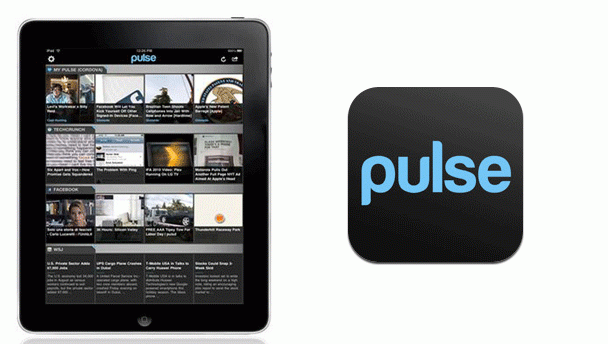
Pulse
Free
This app is the finest app of its kind and could only be done on the iPad. The app is made up of five pages with each page giving you space for up to 12 feeds. The interface is sublime, with each feed generating a swipable ticker ribbon of boxes that feature the story photo and summary.
Tapping a story brings up a plain and uncluttered version of the story which can be expanded to the actual web page if needed. Any pictures attached to the story can be viewed in-app and any YouTube or HTML5 clips can also be viewed.
The best feature is the Facebook and Twitter integration that allows you to post on the social networks without leaving the app.
Pros: Visually stunning; amazingly flexible; Twitter integration is very effective.
Cons: The odd crash or two; not all feed display correctly and videos sometimes fail too.
Free
Twitter is fast becoming one of the most versatile news sources on the planet with breaking stories circulating at light speed thanks the viral nature of the service. Websites and media outlets have quickly realised this and most now have a Twitter feed of top stories to complement their regular output.
Flipboard is a little bit different to the rest of the apps here because it is a Twitter reader. You might think that this is a bit redundant but then you use the app and are completely won over by the way it changes your favourite Twitterers into a visually arresting news wire.
Each page can hold 9 Twitter feeds so you can organise a page around a certain topic with ease and when you tap a particular feed, all the tweets are laid out on a clean magazine style with pictures already embedded rather than a link.
Pros: Visually appealing with intuitive navigation; makes re-tweeting a doddle
Cons: Can be overwhelming; can’t compose new tweets in the app.
LISTEN: You Must Be Jokin’ podcast – listen to the latest episode now!