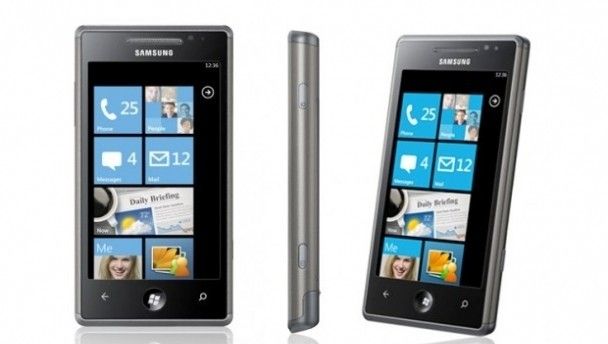
With Windows Phone 7 handsets cropping up everywhere these days, we test out the Samsung Omnia 7 and it’s super-sleek metal finish.
Windows Phone 7 is quickly becoming a major player in the great smartphone operating system wars, as their recent collaboration with Nokia attests. As such, we’ve been looking at some of the top Windows phones in recent days, from the HTC HD7 last week to the Samsung Omnia 7 today.
Weighing 138g and featuring a lush 4-inch Super AMOLED screen, the Omnia 7 feels high-end from the moment it’s thrust into your hand. Wider than the HD7 and easily trumping the dimensions of the iPhone 4, Samsung’s handset is reassuringly bulky, while the almost all-metal back side of the phone is a great touch. Even the battery cover is easy to remove, which immediately sets the device apart from its biggest rivals.

Samsung are bringing sexy back with the Omnia 7’s sexy back – true story
As for specifications, the Omnia is remarkably similar to the Samsung Galaxy S – an excellent 5MP camera each, 1500mAh battery, 720p video recording and 4-inch screen. Of course the clue to what really sets Samsung’s device apart is in the name – Samsung’s Omnia was followed by the Omnia II which now has, seemingly illogically, been followed by the Omnia 7 – in actual fact, this is the Windows Phone 7 take on Samsung’s much-loved handset.
As is becoming the norm for Windows’ releases, the OS branding encompasses the entire experience of the phone. Log in with your Xbox Live/Hotmail account and suddenly you’ll see your Hotmail contacts popping up on your home screen, your Outlook emails refreshing and your Xbox Live Avatar ready to hunt for bargains.
Custom-built apps
Outside of Windows-branded start-up apps, Samsung have decided to include just two of their own custom-built apps – ‘Now’ and Photo Sharing. Now is a great feature and a fantastic starting point for any user’s morning breakfast – a combination of a stockticker, live weather report and news from Reuters feed. We expect many phones to carry a similar app in the near-future – it’s too intuitive an app to disregard – though the Omnia 7 would benefit from the abiliy to customise Now outlets and perhaps incorporate a live tile to help the phone direct owners to breaking news.
As for photo sharing, it’s a piece of software allows you share photos online – no it’s not really going to set the world alight, but it’s a nice inclusion all the same. In truth though, the Omnia 7 has to be one of the most fully-featured phones we’ve got our hands on in months and the dynamic, ‘live’ tiles are easy to navigate and seem a perfect fit for Samsung.
Windows Phone 7 are still in the embryonic stages of potential world domination though we’ve been impressed by the intuitive setup and user-centred experience thus far. While certain additions (true multi-tasking, copy and paste) are only on the horizon for now, the Samsung Omnia 7 is an ideal purchase for anyone hoping to make the big leap over to Windows.
With gorgeous design, an eye-popping screen and useful Omnia-only inclusions, it’s quite shocking to see that Samsung are now already quite a few steps ahead of their rivals when it comes to marking their territory on Microsoft’s burgeoning OS.
LISTEN: You Must Be Jokin’ podcast – listen to the latest episode now!